Trazu - Real Paint Physics
Real Paint. No Mess.
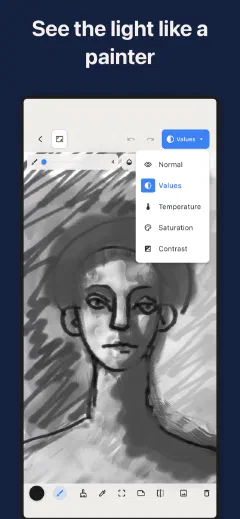
Most painting apps just lay flat color. Trazu makes paint that behaves. Your brush carries a finite charge that depletes as you stroke, picks up and mixes with the wet color already on the canvas, and catches on real paper grain. You can also flip your own painting into value, temperature, and saturation views to see why it works, mid-stroke.
For painters who want real paint in their pocket.
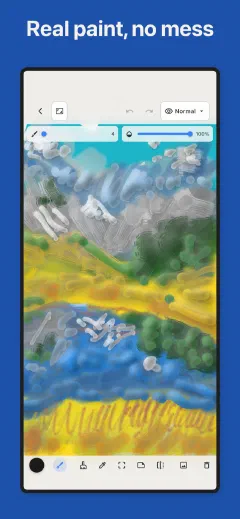
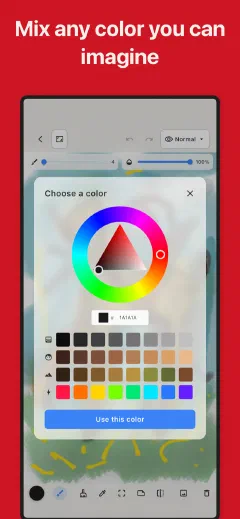
Most paint apps are not really painting. You drop a shape, you fill it with a color, you move on. Nothing loads. Nothing depletes. Nothing mixes. Every painter can feel the difference, even when they cannot name it. The strokes sit on top of the screen instead of becoming part of the surface.
Trazu rebuilds the part that matters. The brush carries a finite charge of paint that runs out as you drag it. Push into wet color already on the canvas and it lifts, smears, and mixes, the way a loaded filbert does through fresh oil. Press harder and the stroke widens. Move faster and it thins and breaks. Real paint, real grain, no turpentine, no cleanup, no drying time. And the same value, temperature, and saturation lenses from Undertone live inside your canvas, so the moment a painting goes wrong you can see exactly where.
Paint That Behaves Like Paint
Real Paint Physics
This is the part every other app fakes. Your brush holds a finite charge of paint and it depletes as you stroke, so a long drag fades and breaks the way a real one does. Drag through color already on the canvas and it picks up, smears, and mixes wet into wet. Pressure changes the width and the load. Speed changes how the paint lays down and where it starts to skip. You are loading a brush and pulling it through wet paint.
Nine Mediums, Twelve Papers
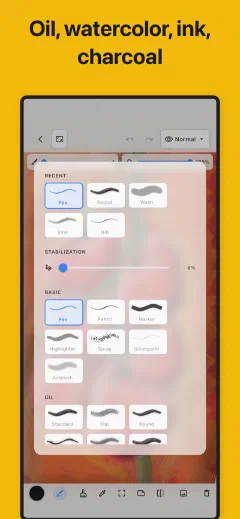
Oil, watercolor, charcoal, chalk, pastel, ink, airbrush, a blending medium, and a basic medium, each with its own behavior, not the same brush with a different label. Oil drags and blends. Watercolor pools and bleeds. Charcoal and pastel grab the tooth of the paper. Inside each medium you get the real tips: round, flat, filbert, fan, palette knife, nib, wash, dry, and more. Then choose what you paint on. Twelve paper textures the paint actually catches on: smooth, hot-press watercolor, cold-press watercolor, rough watercolor, canvas weave, toned tan, toned grey, kraft, and blueprint, plus a master's shelf of black pastel ground, laid Ingres, and terracotta. The grain is not a background image. It is the surface your stroke fights with.
Four Study Views, Inside Your Canvas
This is what no other paint app does. Every painter hits the moment when a piece is not working and they cannot say why. The color is fine but it reads like mud. Trazu puts the Undertone analysis lenses inside your own work in progress. Flip your painting into Value to see your light-dark structure in grayscale, the way squinting reveals that all your darks are actually the same. Flip to Temperature to see where warm is leaking into your cools. Then Saturation, then Contrast. You diagnose your own painting while you paint it, not after it is too late to fix. Seeing is not the same as sensing, and now you can do both on the same canvas.
The Full Tool Set
A real surface needs real tools. Eraser, paint bucket flood fill, eyedropper, and a rectangle selection with resize handles. Transform to rotate and flip, crop, and copy, cut, and paste. Import an image to paint over or trace from. Undo and redo so a bad stroke costs you nothing. When the work is done, export to PNG or JPEG and it leaves the way you want it. Nothing fancy for the sake of fancy. The tools a painter reaches for, and no clutter you have to fight past.
How It Works
- Pick a medium and a paper. Load your brush with a color.
- Paint. The charge depletes, the colors mix, the grain catches.
- Stuck? Flip to value or temperature and see what is wrong, then keep painting.
Who This Is For
Painters Who Want to Practice Anywhere
You know the tax on real paint. Lay out the palette, load the brushes, paint for twenty minutes, then spend twenty more cleaning up and watching pigment go down the sink. So you paint less than you mean to. Trazu gives you the loaded brush and the wet-into-wet mixing without the setup, the smell, or the waste. Practice a color study on the bus. Pull a brush through wet ochre while the kettle boils. The paint behaves like paint, so the practice actually transfers.
Students Learning the Fundamentals
Your teacher keeps saying value, temperature, edges, and you nod, but you cannot see it in your own work yet. That is the hardest gap in art, the gap between hearing the word and seeing the thing. Trazu lets you paint a study and then flip it into value to check if your darks hold together, or into temperature to catch the warm shadow you did not mean to make. You stop pushing color around blind. You start seeing your own structure, which is the only way the fundamentals ever stick.
Sketchers and Illustrators
You want real media feel on the device you already carry, not a stack of brushes that all behave the same. You want charcoal that grabs the tooth, ink with a nib that responds to pressure, watercolor that bleeds. And you want it offline on a train and private by default, with no account asking for your email before you can draw a line. Open Trazu and the brush is already loaded. That is the whole ceremony.
Anyone Returning to Art
The professional apps are a wall of panels and settings, and the blank canvas feels like a test you did not study for. You do not want a flight deck. You want paint that just behaves like paint so you can remember why you liked this. Trazu starts simple. Pick oil, pick a paper, load a color, and pull. It feels like the real thing because the paint runs out, mixes, and catches the way you remember. No cleanup waiting to punish you for trying.
"I have used every drawing app on the App Store and they all do the same thing: you draw a line and it just sits there, flat, perfect, dead. Trazu is the first one where I loaded a palette knife, scraped it across wet paint, and it actually pushed the color and ran out halfway. Then I got stuck on a portrait, flipped it to value, and saw the whole face was one tone. I fixed it in five minutes. I have never been able to do that on a phone."
-- Camila, illustrator and former oil painter, Valparaiso
Pricing
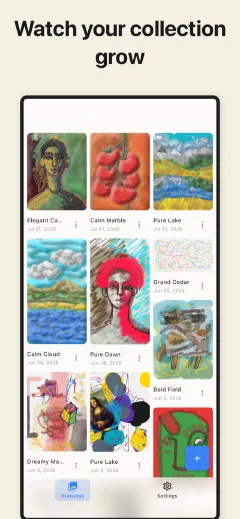
Free to start, with the full paint engine, seven mediums, and nine paper textures from the first stroke. Nothing about the way the paint behaves is locked. The free tier lets you save up to 10 drawings, which is plenty to learn whether this feels like the real thing.
When you are ready for the whole studio, Trazu Premium unlocks it with a single purchase:
Your Drawings Stay on Your Device
- Everything happens on your device. Your drawings are never sent to any server.
- No account. No sign-up. No email. Open the app and start painting.
- No ads. No cross-app tracking. We have no way to see what you make.
- Works fully offline. One-time purchase, not a subscription.
Common Questions
What makes Trazu different from other drawing and painting apps?
Does Trazu work offline?
What are the view modes, and why would a painter use them?
Is Trazu free?
Do my drawings stay private?
Still have a question? Get help →
Real Paint, In Your Pocket.
Trazu is out now on iPhone, iPad, Mac, and Android. Paint that loads, depletes, and mixes, with the lenses to see why your work works, all in your pocket.