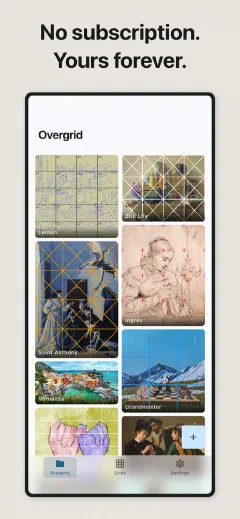
Overlay a precision grid on any reference photo. Transfer proportions to canvas accurately. Crop, customize, export. Done.
Free to use. One-time purchase for everything.
Teaching the grid method? Overgrid makes the setup instant.
The grid method is a technique artists have used for centuries to transfer an image from a reference to a canvas while keeping proportions accurate. Albrecht Durer used it. Chuck Close used it. Thousands of working painters use it every day.
The principle is simple. Draw a grid over your reference photo. Draw a matching grid on your canvas. Then copy the image one square at a time. Instead of wrestling with the entire composition at once, you focus on a small, manageable piece. The proportions take care of themselves.
Traditionally this means printing your photo, drawing lines on it with a ruler, and measuring everything by hand. It works, but it is slow, and the grid you drew is the grid you are stuck with.
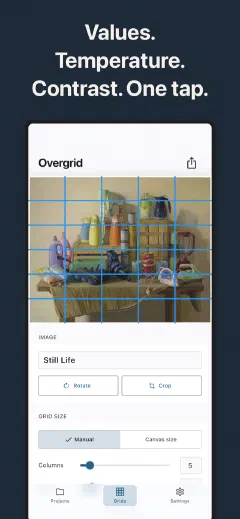
Overgrid replaces the ruler. Import any photo, set your rows and columns, and the grid appears instantly. Change it as often as you like. Crop to your exact canvas proportions first, so nothing is wasted. The grid adjusts its color automatically to stay visible on any image. When you are ready, export the gridded image at full resolution and prop it next to your easel.
The method has not changed since the Renaissance. The tool has.
Durer gridded. Vermeer gridded. The method is 500 years old. The app is new.
THE GRID IN ACTION
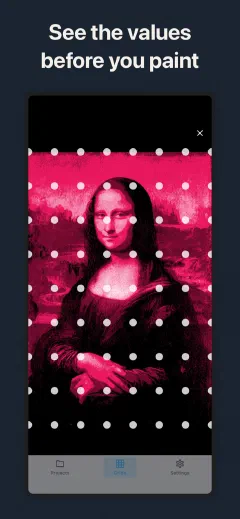
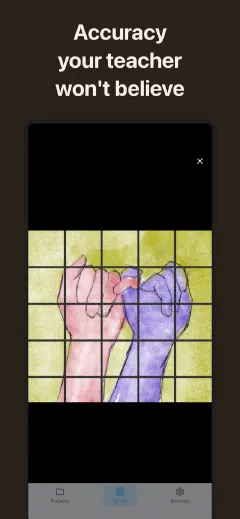
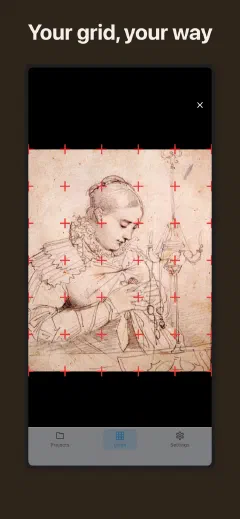
Classical paintings, modern precision. Proportions you can trust.
Overgrid is free to download. The free version gives you a working grid tool: basic overlay, 5 colors, 1080px export, and 3 projects. It is genuinely useful, not a crippled demo.
If you want everything, there is one option.
Overgrid has no account to create. No cloud to upload to. No ads to sit through. Everything happens on your device. Your reference photos, your grid settings, your projects — all local, all private.
Uninstall the app and everything is gone. There is nothing on our servers because your data was never on our servers.
We built Overgrid this way on purpose. An artist's reference library is personal. It should stay that way.
The grid method is a technique for transferring an image from a reference photo to your canvas while keeping proportions accurate. You overlay a grid on the reference, draw a matching grid on your canvas, then copy the contents square by square. Artists have used it for centuries — from Albrecht Durer to modern hyperrealists. Overgrid replaces the pencil-and-ruler step with a precise digital grid you can customize in seconds.
Open your reference photo in Overgrid and set the number of rows and columns. Use the crop tool to match your canvas proportions. Draw a matching grid lightly on your canvas with charcoal or pencil. Then transfer the image one square at a time — focus only on the shapes within each square. This breaks complex compositions into manageable pieces and keeps everything in proportion at any scale.
Yes. The free tier includes a basic grid overlay, 5 grid colors, export at 1080px, and up to 3 projects. This is a working tool, not a trial. Premium is a single payment and unlocks everything: unlimited projects, custom RGB colors, adaptive contrast, value studies, temperature overlays, diagonals, numbering, presets, and full-resolution export up to 4096px. No subscription.
A value study reduces your reference image to a limited number of tonal levels — usually 3 to 5 — so you can see the underlying structure of light and shadow without the distraction of color and detail. It helps you plan a stronger composition before committing expensive paint to canvas. Overgrid generates value studies from any photo automatically.
No. All images and projects stay on your device. Overgrid requires no account, has no cloud storage, and shows no ads. Your reference photos never leave your phone or tablet.
Overgrid runs on iPhone, iPad, and Android. The same purchase unlocks premium on all devices linked to your App Store or Google Play account.
Adaptive contrast analyzes the tones in your reference photo and automatically selects grid line colors that remain visible against the background. On a dark image the grid shifts lighter. On a light image it shifts darker. You never lose sight of the grid lines, regardless of the reference.
Yes. Import any image from your photo library or take a new one with your camera directly from the app. Overgrid handles images of any size.
Open the app and go to Settings, then tap Restore Purchase. Your purchase is tied to your App Store or Google Play account and transfers to any device signed in with the same account.
Free on iOS, Android, and iPad.