
Skisa: Photo to line art
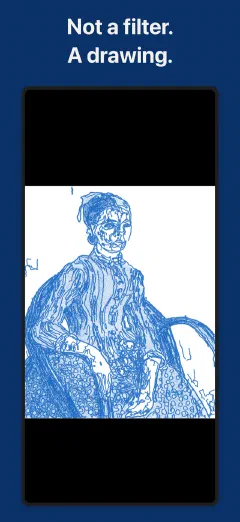
Not a filter. A drawing.
Skisa draws your photo with a real instrument on real paper, for tracing, stencils, and coloring.
Free to use. One-time purchase for the full workshop, no subscription.
Skisa: Photo to line art
Skisa draws your photo with a real instrument on real paper, for tracing, stencils, and coloring.
Free to use. One-time purchase for the full workshop, no subscription.
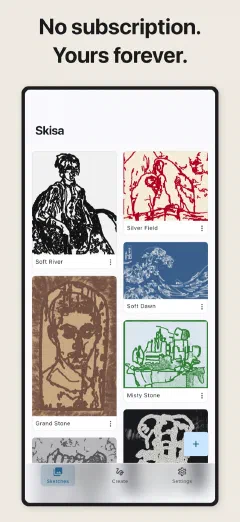
You want to turn a photo into a line drawing. So you try the apps. One runs your photo through a filter and hands back a flat, generic outline. The next locks the good tools behind a weekly subscription before you can save. A third stamps its own name across the middle of your result.
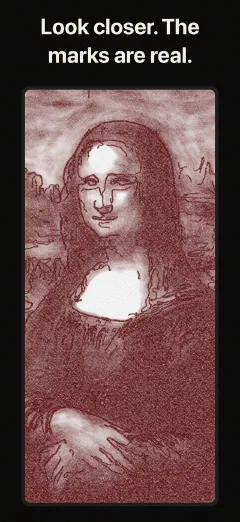
Skisa does none of that. It does not filter your photo, it draws it. You pick an instrument and a sheet of paper, and the drawing comes out the way that pairing would come out in your hand: ink piling up where two strokes cross, the paper's tooth biting into the light ones.
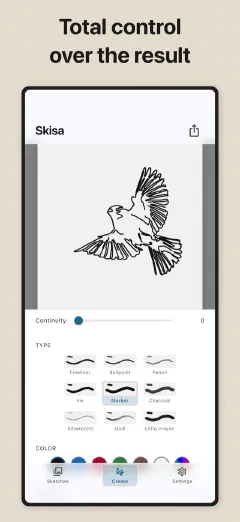
The instrument is your choice. The paper, the shading, the ink color, and the amount of detail are all yours. The sliders finish the drawing, from only the strongest edges to every contour, from a precise hand to a searching one. Nothing is guessed, and nothing is invented out of thin air.
Everything happens on your device, and your photos stay yours. Pay once, and the full workshop is yours for good.
A filter flattens a photo into an outline. Skisa draws it, one real stroke at a time.
Pick a photo or take one, and the drawing appears the moment it loads, so you are always shaping a drawing, not waiting to get one. Crop, rotate, and flip freehand or locked to portrait or landscape.
A fineliner lays an even line. A ballpoint skips and pools. A pencil varies with pressure. Charcoal runs soft and broad. Silverpoint is the faint grey line Leonardo drew with, a quill runs dry mid-stroke, and a litho crayon carries its own grain.
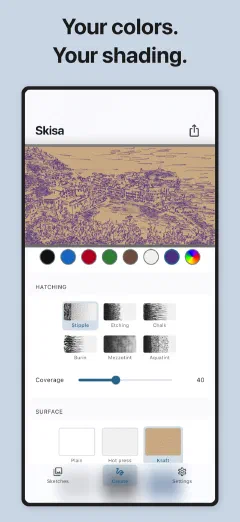
Hot press with a fine tooth, fibrous brown kraft, toned grey made for charcoal, a black ground, a blueprint, and a plain printer's sheet you can tint ivory, pale blue, indigo, or burgundy. On the dark grounds you draw in white chalk, pulling the light out of the dark.
Stipple builds tone out of dots. Etching is the needle's crosshatch. Burin is the engraver's swelling cut. Aquatint bites its tone in flat fields. Mezzotint burnishes the lights back out of a rocked black plate, the way the darkest prints in history were made.
Draw in graphite, blue, red, green, sepia, or white chalk, or mix any color you want and keep it one tap away. Then the sliders finish the drawing: detail, thickness, looseness, and continuity, from the strongest edges alone to every last contour.
Export a transparent PNG with nothing behind the lines, ready to trace, print, or drop into any app. The paper still shapes the strokes, only the sheet is left out. The preview and the final file come from the same engine.
Lay a clean underdrawing beneath your painting, or trace a portrait onto canvas or a lightbox. A real instrument on real paper, so the underdrawing looks drawn, not printed. You set the detail, the weight, and the hand.
Turn a reference into a clean line stencil, in the weight and detail you want. Export it as a transparent PNG with nothing behind the lines, ready to print and transfer.
Turn a favorite photo into a coloring page and print it. The lines come out clean enough to color inside, tinted onto a plain sheet, at whatever detail suits young hands or older ones.
Cut a stencil, a craft template, or a plotter-ready outline from any photo. A transparent background stays transparent, so the lines drop straight into whatever you are building.
Skisa is free to use, and the free version is a real tool, not a crippled demo. You get six instruments, every paper, three ways to shade, all the sliders, the ink colors and the sheet tints, transparent PNG export, saving up to 1024 px, and five sketches at a time.
If you want the full workshop, there is one option.
One-time purchase. No subscription, no recurring charge. Pay once, and it is yours.
The photos you bring in and the drawings Skisa makes from them stay on your device. Deleting a sketch removes it, and uninstalling Skisa removes them all. They stay yours because there is nowhere else for them to go.
To keep the app working well, Skisa sends anonymous usage and crash information tied to a random ID, not your name or your email. It never includes your photos or your drawings. You can read exactly what leaves the device on our privacy page.
We built Skisa this way on purpose. Your photos are personal, and they should stay that way. Enjoy the craft.
In Sketches, tap + and choose Gallery or Camera. The drawing appears as soon as the photo loads.
It saves only the lines, as a PNG with nothing behind them. You can then lay the drawing over a photo, a color or another drawing in any app. Turn on Transparent background when you export. It’s free.
Skisa is free to use, with no time limit and no watermark. Premium is one payment, not a subscription. You see the price in your currency before you pay, and Apple or Google handles the payment.
Free
Premium
No. Your Premium is still yours. It belongs to your App Store or Google Play account.
Use the same account you bought with. There’s no separate login. Apple and Google are separate stores, so a purchase on iPhone does not carry over to Android.
Yes. Your photos and sketches are saved on your device and never uploaded, and there’s no account.
Skisa sends anonymous usage statistics and crash reports, tied to a random ID. They carry no images and nothing that identifies you. Their only job is to help us make Skisa better.
Uninstalling Skisa removes your sketches, so export anything you want to keep.
Still have a question? Get help →
Free on iOS, Android, iPad, and Mac.