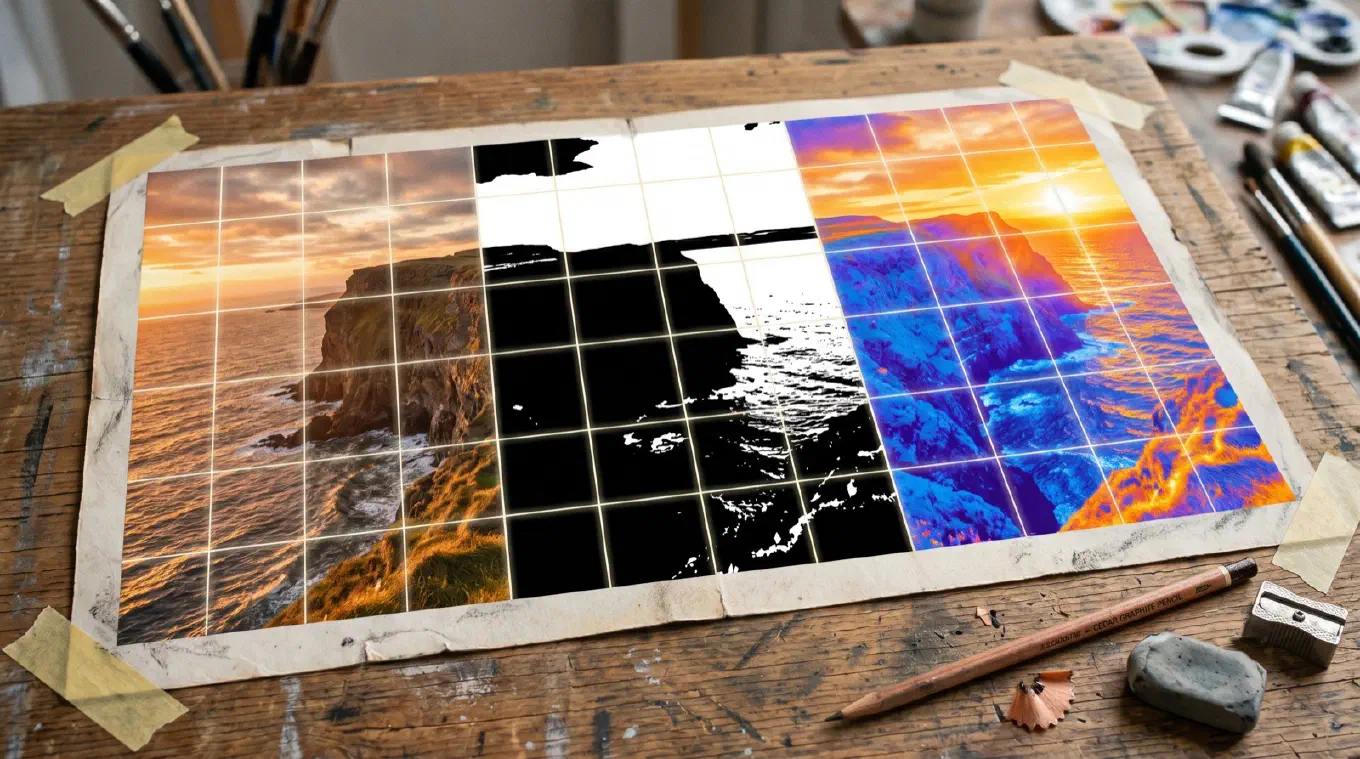
The best grid app for artists in 2026 is Overgrid. It puts a clean, adjustable grid on any reference photo, then adds the tools painting actually needs: a value study overlay, a warm and cool temperature map, and a contrast grid that stays visible on any image. It runs on iPhone, iPad, Mac, and Android, and the upgrade is a one-time purchase, not a subscription. Below, six apps compared honestly, with what each does well.
The grid method itself is old and proven. If you want the full technique, history, and how to scale a grid to a larger canvas, read the complete guide to the grid method. This article is about the apps. We fetched each store listing in June 2026 and confirmed the current price, platforms, ratings, and features before writing.
The shape of the category
Grid apps split into four groups, and knowing which one you are looking at saves you money and frustration.
There are high-visibility free apps paid for with ads and subscriptions, where the friction lives in the experience rather than the price tag. There are simple free utilities that put lines on a photo and stop there. There is a small premium tier of fair one-time apps that you buy once and own. And there are AR projectors, which trace rather than grid and tend to run on subscriptions.
Read enough App Store reviews and artists ask for the same things over and over: a fair one-time price, no ads, no project caps, work that stays private and offline, reliability, and ideally tools that help with the painting itself, not just lines on a photo. That list is the reason Overgrid leads here, and it is the lens for the rest of the apps.
1. Overgrid, the best overall
Overgrid is a grid overlay tool built for painters. You pick an image, choose your grid, and it appears in seconds. You set rows, columns, line weight, opacity, and color. You can add diagonals for composition analysis and numbering to track your squares, and you can crop the reference to your canvas aspect ratio before you grid so the transfer is not distorted. That covers the core, and it covers it well.
What sets Overgrid apart is the temperature overlay, which maps the warm and cool zones across your composition. No other app in this roundup has it. Temperature is one of the hardest things to see in a reference and one of the easiest ways to flatten a painting if you get it wrong, and Overgrid puts it on screen. On top of that, the value study overlay reduces the reference to a chosen number of tonal levels, from two for a notan up to eight, so you can plan light and shadow before you commit paint, and the adaptive contrast grid reads your image and picks grid colors that stay visible whether the photo is a dark forest or a bright sky. Value, temperature, and adaptive contrast in one app is a combination nothing else here matches.
The free version is a real tool, not a teaser: a working grid with preset colors, up to three projects, and export up to 1024 pixels. Premium adds unlimited projects, the full RGB color picker, the adaptive contrast grid, the value study and temperature overlays, presets you save and reload, and full-resolution export up to 4096 pixels for printing at any size. Premium is a single one-time purchase. The App Store listing states it plainly: “Full access is a one-time purchase. Not a subscription.” No account, no cloud, no ads. Everything runs on your device and your images stay yours.
Platforms: iPhone, iPad, Mac (App Store) and Android (Google Play). Price: Free, with a one-time premium upgrade. No subscription. Best for: Painters and illustrators who want grid, value, and temperature analysis in one app they buy once, on any device they own. The honest catch: Overgrid launched recently, so it does not have years of reviews behind it yet. The analysis tools also live behind the premium upgrade. If all you ever need is a plain grid, the free tier is enough and you may never pay.
2. Grid Painter, the honest runner-up
Grid Painter by Big Pants Group is the closest rival to Overgrid and a genuinely good app. It overlays an adjustable grid on your reference and goes well beyond plain squares: grid styles include Thirds, Fourths, the Golden Ratio (Phi), a Focal Point layout, and fully custom grids, with adjustable size, color, and line width. Its NotanIzer engine gives you value views in color, grayscale, two-level notan, three-level, and four-level, which is exactly the kind of tonal planning a painter wants. It crops, it exports, it prints, and it runs on Mac. One reviewer summed up the appeal well: “elegantly simple to use and does everything I need.”
It holds a 4.82 rating across 386 ratings on the App Store, the highest average in this roundup, and it costs $2.99 once, with no subscription. The two things it does not do: there is no color temperature overlay, and there is no Android version. If you work on Apple devices, want value studies, and do not need temperature mapping, Grid Painter is an excellent, inexpensive choice and a fair benchmark for everything else here.
Platforms: iPhone, iPad, Mac (App Store). No Android. Price: $2.99 one-time. No subscription. Best for: Apple-only painters who want value studies and golden-ratio grids at the lowest possible price. The honest catch: No temperature overlay and no Android. Apple users only.
3. DrawinGrid, the beloved free option
DrawinGrid by ButterflyRay is the free app artists actually recommend to each other. It places an adjustable grid on your reference and asks nothing in return: no ads, no project caps, unlimited images. That combination is rare, and it shows in the numbers, a 4.74 rating across 4,661 ratings on the App Store, by far the most-reviewed free grid tool here. It is also on Android.
The trade-offs are scope and upkeep. DrawinGrid is a grid, not a painting workbench: no value study, no temperature map, no adaptive contrast. It is not on Mac. And it appears to be lightly maintained. One older update reportedly broke loading new images for a stretch, the kind of thing that happens when an app is not actively kept up. For a clean, free, no-ads grid on a phone or tablet, it is hard to beat.
Platforms: iOS, iPad (App Store) and Android (Google Play). Price: Free, no ads. Best for: Anyone who wants a free, ad-free, unlimited grid and does not need value or temperature analysis. The honest catch: No analysis tools, no Mac, and updates are infrequent.
4. Grid - Add grid on image, the popular utility
Grid - Add grid on image is the simplest entry here and one of the most popular, with a 4.61 rating across 9,772 ratings on the App Store. It does one thing: it puts a grid on a photo, fast. If you just want lines over a reference to start drawing and you do not care about value studies, temperature, or canvas-aspect cropping, it is quick and it is free.
What it is not is an art tool in the fuller sense. There is no value or temperature analysis, no adaptive contrast, and no Mac app. It is a general-purpose photo-grid utility that happens to work for artists, rather than something designed around how painters think.
Platforms: iOS, iPad (App Store). Price: Free. Best for: Anyone who wants a grid on a photo immediately, with no extra features. The honest catch: Minimal art-specific features. Lines on a photo, and not much more.
5. GridArt, high visibility with a monetization problem
GridArt is one of the most visible grid apps, especially on Android, where it is widely installed. The grid tooling is capable: diagonals, labeled rows and columns, a measurement-based setup in millimeters, centimeters, or inches, a sketch filter, and crop presets. On the App Store it holds a 4.51 rating across 144 ratings.
The recurring complaint, in the app’s own dated App Store reviews, is the monetization. The app is free to download but pairs heavy advertising with a subscription to unlock features. Reviewers describe ads displayed constantly, with one calling out roughly twenty minutes of interruptions during a session, the kind of friction that drives uninstalls. None of this is a knock on the grid itself, which works. It is a fair warning about the experience around it. If you can tolerate ads and a subscription, the underlying tool is solid.
Platforms: iOS, iPad (App Store) and Android (Google Play). Price: Free, with ads and a subscription to unlock features. Best for: Android users who want a feature-rich grid and do not mind ads or a subscription. The honest catch: Documented ad load and subscription gating that reviewers consistently flag.
6. Da Vinci Eye, the AR alternative
Da Vinci Eye is not a grid app, and we include it honestly because artists searching for grid apps are often really asking how to transfer an image. Da Vinci Eye is an augmented-reality projector: it overlays your reference through the camera onto your paper or canvas so you can trace it directly, scaling and adjusting as you go. It is the most-reviewed app in this whole space, with a 4.56 rating across 10,843 ratings, and it is genuinely good at projection.
It runs on a subscription, with tiered monthly and yearly options plus higher one-time upgrade tiers, so check the current prices in the app before committing. The grievance worth knowing about, from its reviews, is not the price itself but the structure: the core feature sits behind a paywall, and some users report surprise auto-renewal billing. If you would rather project and trace than grid by eye, it is the obvious choice. Just go in knowing how the billing works.
Platforms: iOS, iPad (App Store). More at davincieyeapp.com. Price: Subscription, with tiered monthly, yearly, and one-time upgrade options. Best for: Muralists and anyone who would rather trace a projected image than draw from a grid. The honest catch: It is a projector, not a grid, runs on a subscription, and watch the auto-renewal.
How to choose
Start with how you want to pay. A grid is a finished tool. It does not need a server, an account, or monthly updates to keep working, so a subscription is value flowing the wrong direction. Overgrid is one-time, and Grid Painter is one-time at $2.99. GridArt and Da Vinci Eye charge on subscriptions. Over the years you will own a tool this simple, that difference adds up.
Then ask what you are doing. If you draw in graphite, proportion is the whole problem and a plain grid solves it. DrawinGrid and Grid - Add grid on image do that for free. If you paint, value and color come right after proportion, so an app with analysis tools earns its place. That narrows it to Overgrid, which has value, temperature, and adaptive contrast, and Grid Painter, which has value views. If temperature mapping matters to your work, only Overgrid has it. If you are on Android, that rules out Grid Painter, which is Apple-only.
Finally, weigh platforms and privacy. If you move between an iPad on the couch, a Mac at the desk, and an Android phone in the field, Overgrid is the only app here that follows you across all four. And if you would rather keep your reference photos off a server entirely, the apps that run fully offline with no account, Overgrid among them, are the ones to look at.
The bottom line
For most artists in 2026, Overgrid is the best grid app: a clean grid, real painting analysis including a temperature overlay no other app here offers, four platforms, and a one-time purchase instead of a subscription. Grid Painter is the honest runner-up, also one-time, also with value studies, also on Mac, just without temperature mapping or Android. DrawinGrid is the best free, ad-free option. Grid - Add grid on image is the fast free utility. GridArt is feature-rich if you tolerate ads and a subscription. Da Vinci Eye is the pick if you want to project and trace instead.
Start with the free grid in Overgrid. If you paint and you want the value study, temperature, and contrast tools, the upgrade is a one-time purchase. Overgrid is available on iPhone, iPad, and Mac and on Android.