Strelo: Vector design
Strelo is a real vector editor on the screen in your hand. Draw logos, icons, stickers and cut files with the Pencil, the Pen, shapes and text, and export the SVG for free.
Free to use. One-time purchase for Premium, no subscription.


You need a vector file. A logo for a friend's shop, an icon, a sheet of stickers, a design to cut in vinyl or engrave in wood.
Draw with your finger or a stylus, and the Pencil turns each stroke into a smooth curve you can still edit. Build with shapes, the way most logos are really made: merge them, cut one out of another, keep only where they overlap. Then fix any point until the curve is exactly right.
Every design keeps its own unit, pixels for an icon, millimeters for an A4 sheet, inches for a cutting mat. The SVG states that unit, so your cutting software opens it at its true size.
Your designs stay on your device, and the SVG is always free. Premium adds a few power tools and the files for print, paid once and yours for good.
A vector stays sharp at any size. Strelo makes drawing one as easy as drawing a line.
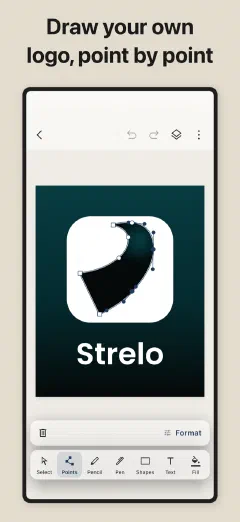
Draw freely with the Pencil, and each stroke becomes a smooth curve you can edit, as even as you set it. Or place every point with the Pen: tap for a corner, drag for a curve. On a touch screen, a loupe above your finger shows the point you are placing, so you never draw blind.
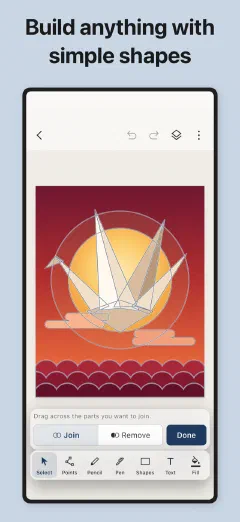
Rectangles, ellipses, polygons, stars and lines, with corners, sides and points you can change after you draw them. Unite, Subtract, Intersect or Exclude them, or drag across the overlapping parts with Shape Builder to join them or remove them.
Drag any point and its handles until the curve is right. Tap a line to add a point, and double tap a point to switch it between smooth and corner. Type exact position and size when the numbers matter.
Sixteen fonts, with size, alignment and letter spacing, spaced by the font's own rules. Every export turns the letters into outlines, so the file looks the same everywhere and a cutter follows the true edge of each letter.
Add a photo or a sketch, then move, turn and stretch it like any shape. Fade it to draw on top, or keep it in your design. Tap the empty artboard with Fill to paint the background. Open an SVG too, and edit its shapes like your own.
SVG for the web, cutters and lasers, and PNG at 1× or 2×, or at 150 or 300 dpi, on a transparent or white background, free and with no watermark. With Premium, a vector PDF at your design's real size for print, and PNG at 4× or 600 dpi.
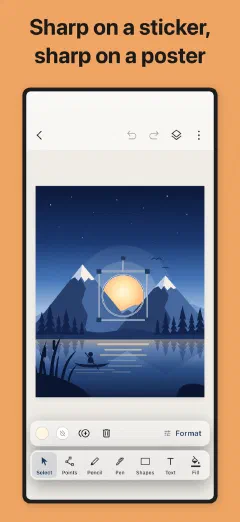
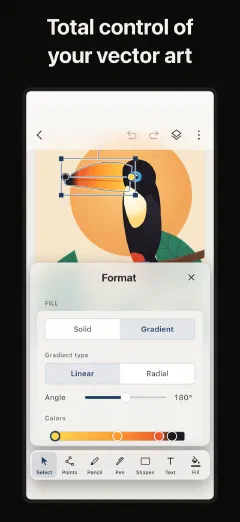
Draw clean vector art with a finger or a stylus. Freehand strokes become curves you can refine, shapes combine into anything, and gradients and layers finish the piece.
Design at the real size of the sticker or the mat, in millimeters or inches. Text becomes outlines and the SVG states its unit, ready for your cutting machine or laser.
Make the logo for your shop, your stall or your side project, and take it everywhere as an SVG for the web, a PNG for social media and, with Premium, a PDF for the printer.
Make an icon or a small vector asset on the iPad, iPhone or Mac you have with you, with exact sizes, alignment and snapping when the numbers matter.
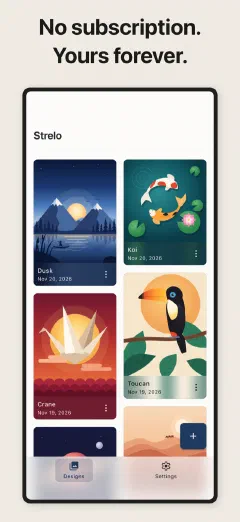
Strelo is free to use, and the free version is the whole editor. You get the Pencil, the Pen, every shape, Shape Builder and every way to combine shapes, point editing, text in 16 fonts, gradients, layers, photos, opening SVG files, and SVG and PNG export, for up to 10 designs at a time.
If you want more designs, the power tools and the files for print, there is one option.
One-time purchase. No subscription, no recurring charge. Pay once, and it is yours.
Your designs, and the photos you bring into them, stay on your device. There is no account, and Strelo never uploads your work.
To keep the app working well, Strelo sends anonymous usage statistics and error reports tied to a random ID, not your name or your email. They never include your designs. You can read exactly what leaves the device on our privacy page.
We built Strelo this way on purpose. What you make is yours, and it should stay that way.
Two tools draw curves:
With a stylus, the stylus draws and your fingers move and zoom the canvas.
Select two or more shapes and tap the combine button:
Shape Builder needs two closed, filled shapes. It is free.
Strelo is free to use, with no time limit and no watermark. Premium is one payment, not a subscription. You see the price in your currency before you pay, and Apple or Google handles the payment.
Free
Premium
No. Your Premium is still yours. It belongs to your App Store or Google Play account.
Use the same account you bought with. There’s no separate login. Apple and Google are separate stores, so a purchase on iPhone does not carry over to Android.
Yes. Make the design in mm or inches, for example with Sticker or Cutting mat. The SVG states that unit, so your cutting software can open it at its true size instead of guessing.
Text is already turned into shapes in every export.
Yes. Your designs, and the photos you add to them, are saved on your device and never uploaded, and there’s no account.
Strelo sends anonymous usage statistics and error reports, tied to a random ID. They carry none of your designs and nothing that identifies you. Their only job is to help us make Strelo better.
Still have a question? Get help →