Ritoko app icon

Ritoko: Photo editor

Make the photo look the way you saw it.

Ritoko is a precise photo editor with real curves, light, color and RAW, computed on your device and exported at full resolution.

Download on the App Store Get it on Google Play
Or scan with
your phone

Free to use, with one purchase for more, never a subscription.

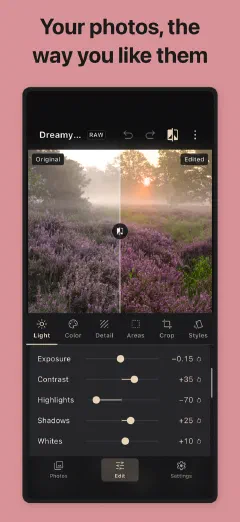
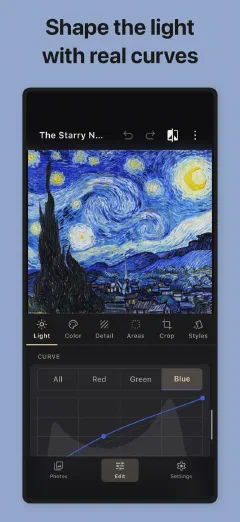
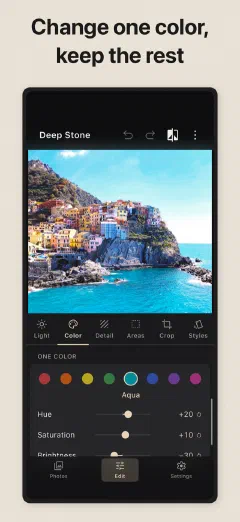
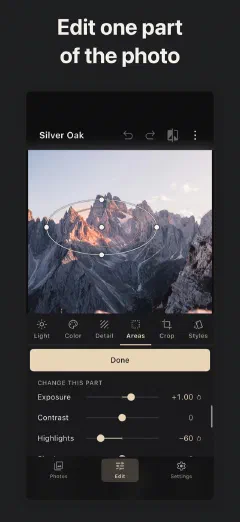
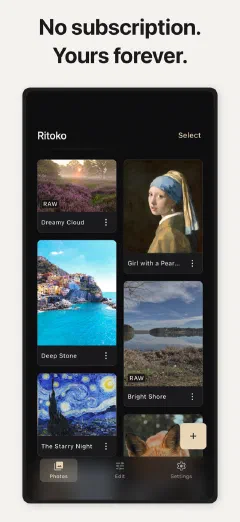
Ritoko: Your photos, the way you like themRitoko: Shape the light with real curvesRitoko: Change one color, keep the restRitoko: Edit one part of the photoRitoko: No subscription. Yours forever.

The edit your phone left out

You took the photo and it came out flat. The sky is too bright, the shadows are muddy, the skin looks orange. The editor built into your phone gives you a few sliders and stops: no curves, no control over a single color. The serious editors want a subscription that keeps getting more expensive, and the free ones want your photos in their cloud.

Ritoko gives you the tools photographers actually use. A large curve you shape with a finger. Exposure, highlights and shadows over a live histogram. White balance from a gray spot you tap. One color changed without touching the rest.

Open a RAW straight from your camera or phone and pull back the highlights it clipped. Your original is never changed. Your edit is a recipe, so you can come back tomorrow and move any slider again.

Everything is computed on your device, and your photos never leave it. Pay once, and it is yours.

A good photo editor is like a good camera: you buy it once, and it gets out of the way.
Ritoko

What Ritoko does

Who Ritoko is for

Pay once. Edit for good.

Ritoko is free to use, and the free version is a real photo editor, not a demo. You get every tool but one, full resolution JPEG and PNG export, four starting styles, and up to 20 photos in your library.

If you want more, there is one option.

Ritoko Premium

One-time purchase. No subscription, no recurring charge. Pay once, and it is yours.

  • Edit an area on its own
  • Keep as many photos as you like
  • Save styles, give a trip one look
  • Export 16-bit TIFF with finer tones

Your photos stay yours

The photos you open and the edits you make stay on your device. Ritoko computes every adjustment there and never uploads your photos. When you export, the file is written without location data.

To keep the app working well, Ritoko sends anonymous usage analytics and error reports, tied to a random ID, not your name or your email. They never include your photos or your edits. You can read exactly what leaves the device on our privacy page.

We built Ritoko this way on purpose. Your photos are personal, and they should stay that way.

Common questions

What is a tone curve, and why does it matter?
A tone curve maps every tone in the photo, from black to white, to a new one. Pull the middle up and the photo brightens without losing its blacks. Bend it into a gentle S and the contrast grows while the highlights and shadows keep their detail. One curve can do what several sliders do, and do it exactly where you want. On a single color channel, it can warm the shadows and cool the highlights in one move.
Why edit a RAW file instead of a JPEG?
A JPEG is a finished picture: the camera has already chosen the white balance, the contrast and what to throw away. A RAW keeps what the sensor recorded, so there is more to work with. A sky that looks white in the JPEG often still has its blue in the RAW, and a shadow that looks black still has its detail. Ritoko opens RAW files from phones and cameras and develops them on your device.
Original photo: does editing change it?

No. Your original is never changed. Ritoko saves your edit beside it as a recipe, so you can reopen the photo and move any slider again.

  • Touch and hold the photo to see it without your edit.
  • Tap Compare to see the original and the edit side by side, split by a line you drag.
Same edit on other photos: how?

Open Styles in the editor.

  • Like the last photo puts the last edit you made on another photo onto this one.
  • Strength fades a style to suit each photo.
  • Save as style keeps an edit you like as a style of your own. That needs Premium.
  • To give many photos one style at once, tap Select in Photos, pick the photos, then tap Apply style. That needs Premium.
Free or paid: what does Premium add?

Ritoko is free to use, with no time limit and no watermark. Premium is one payment, not a subscription. You see the price in your currency before you pay, and Apple or Google handles the payment.

Free

  • Every editing tool except Edit an area
  • Full resolution JPEG and PNG export
  • Four starting styles, and Like the last photo
  • A style on one photo at a time
  • Up to 20 photos in your library. Delete one to add another.

Premium

  • Edit an area in Areas, to change the light and color of one part only
  • Keep as many photos as you like
  • Save as style, to keep your own styles
  • Give many photos one style at once
  • Export 16-bit TIFF, for further editing in another app
Premium on another device: do I pay again?

No. Your Premium is still yours. It belongs to your App Store or Google Play account.

  1. Open the Premium tab.
  2. Tap Restore purchase.

Use the same account you bought with. There’s no separate login. Apple and Google are separate stores, so a purchase on iPhone does not carry over to Android.

Photos and edits: do they stay private?

Yes. Your photos and edits are saved on your device and never uploaded, and there’s no account. Exported files are written without location data.

Ritoko sends anonymous usage statistics and error reports, tied to a random ID. They carry no photos and nothing that identifies you. Their only job is to help us make Ritoko better.

Still have a question? Get help →

Make the photo look the way you saw it.